



Introduction
When your work is scattered across emails, notes, and messages, staying organized becomes a real challenge. Tasks slip through the cracks, deadlines get missed, and teams slowly lose alignment.
This is something I’ve seen happen often, especially as teams grow and start relying on multiple tools without a clear system.
That’s exactly the problem Asana is built to solve.
When used correctly, Asana can turn that chaos into a structured system where every task, project, and deadline is clearly organized in one place.
In this guide, I’ll show you how to organize your work in Asana step by step.
Why Organization in Asana Matters
Asana is more than just a task list — it’s a complete workflow management system.
When set up properly, it helps you:
- Track tasks with clarity
- Manage deadlines more effectively
- Improve team collaboration
- Reduce confusion across projects
- Increase overall productivity
From my experience, even small improvements in how you organize your work can save hours every week.
Step 1: Create Clear Projects
Start by grouping your work into clearly defined projects. Each project should represent a specific area of work, not a mix of unrelated tasks.
Examples:
- Marketing
- Sales
- Development
- Content
Keeping projects focused makes everything easier to manage and track.
Step 2: Break Work Into Tasks
Inside each project, break work down into clear and actionable tasks.
Each task should:
- Have a clear and specific name
- Represent a single action
- Be easy to understand at a glance
Bad example:
- “Work on project”
Good example:
- “Write homepage content”
Clear tasks make execution faster and reduce confusion.
Step 3: Use Sections for Structure
Sections help you organize tasks within a project and create a simple workflow.
Example sections:
- To Do
- In Progress
- Review
- Done
This structure makes it easy to see where each task stands.
Step 4: Assign Tasks Properly
Every task should have a clear owner.
Why it matters:
- Defines responsibility
- Eliminates confusion
- Speeds up execution
From my experience, unassigned tasks are the first ones to get ignored.
Step 5: Set Deadlines
Deadlines keep work moving and create accountability.
Best practices:
- Set realistic due dates
- Avoid vague timelines
- Update deadlines when needed
Without deadlines, tasks tend to get delayed or forgotten.
Step 6: Use Tags and Priorities
Tags help categorize tasks and make filtering easier.
Examples:
- High priority
- Urgent
- Client work
- Internal
This allows you to quickly focus on what matters most.
Step 7: Use Different Views
Asana offers multiple views to manage your work in different ways.
Useful views:
- List view for simple tracking
- Board view for workflow stages
- Timeline view for planning
- Calendar view for deadlines
Switch between views depending on what you need at the moment.
Step 8: Keep Projects Clean
Organization requires regular maintenance to stay effective.
Make it a habit to:
- Remove or archive completed tasks
- Update task statuses
- Clean up old or inactive projects
Clean projects are easier to manage and keep your workflow efficient.
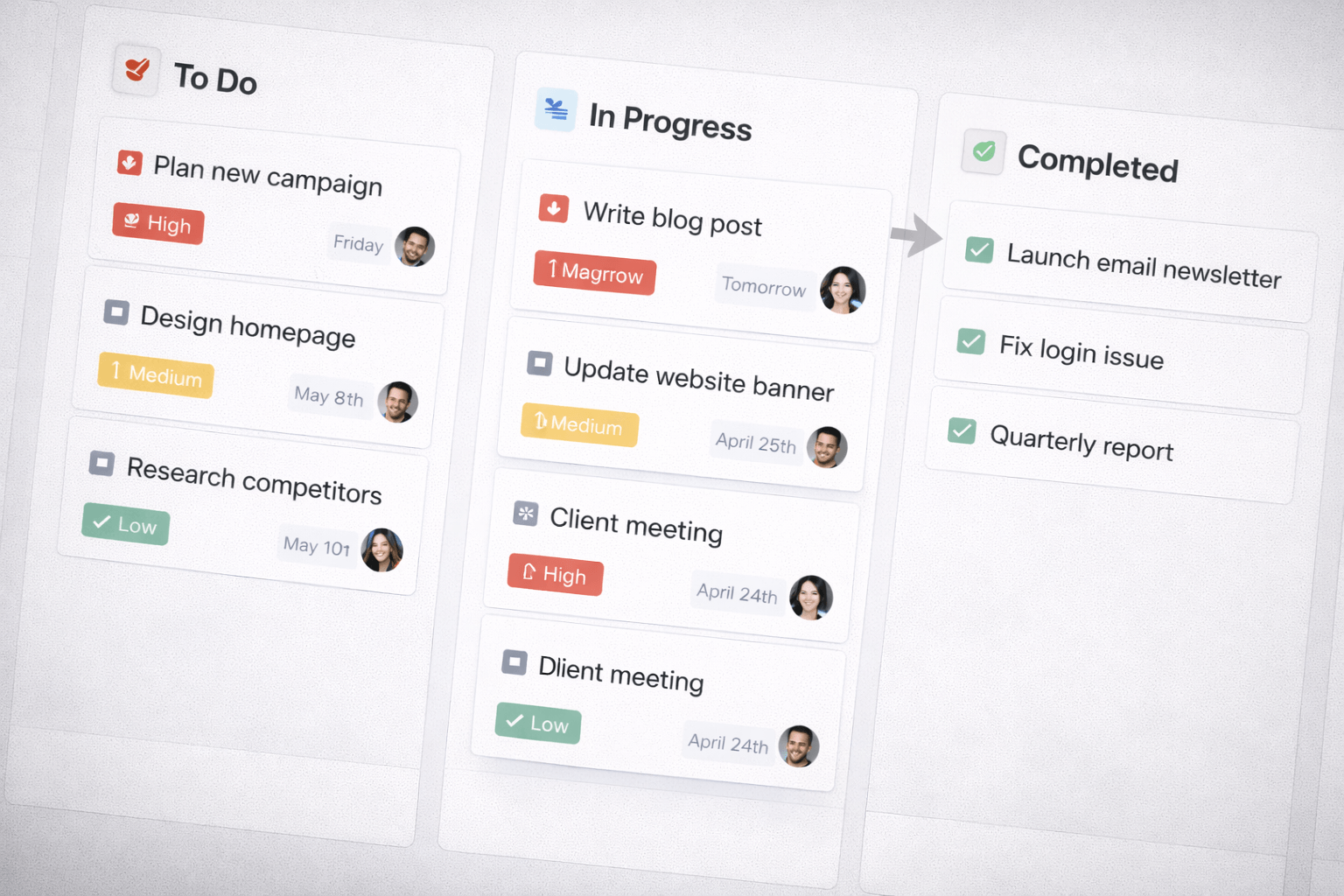
Asana Workflow Example
A simple and effective workflow structure looks like this:
- To Do → Tasks are created
- In Progress → Tasks are actively worked on
- Review → Tasks are waiting for approval
- Done → Tasks are completed
This structure works well for most teams and keeps everything clear and organized.
Asana vs Unorganized Workflow
To clearly see the impact of using Asana, it helps to compare it with an unorganized workflow.
| Task Management | Unorganized | Asana Organized |
|---|---|---|
| Task tracking | Messy | Clear |
| Deadlines | Missed | Tracked |
| Responsibility | Unclear | Assigned |
| Progress | Hard to see | Visible |
From my experience, even a simple Asana setup can dramatically improve visibility and accountability compared to scattered workflows.
Common Mistakes
Creating Too Many Projects
Having too many projects can make navigation confusing and reduce clarity. It’s better to keep things structured and focused.
Not Assigning Tasks
Tasks without an owner often get ignored. Assigning responsibility is essential for accountability.
Overcomplicating Workflows
Trying to build complex systems too early can slow you down. Simple workflows are easier to manage and scale.
Pro Tips for Better Organization
Keep Task Names Clear
Use short, actionable task names so everyone understands what needs to be done immediately.
Review Tasks Daily
A quick daily review helps you stay on track and avoid missed deadlines.
Limit Work in Progress
Working on too many tasks at once reduces focus. Prioritize and complete tasks one by one.
Use Templates
Creating reusable templates can save time and keep your workflow consistent across projects.
Conclusion
Organizing your work in Asana isn’t about building a complex system — it’s about creating clarity.
When tasks are clearly defined, properly assigned, and structured, work becomes faster and more efficient.
Start simple, build consistent habits, and improve your system over time.
Because the most productive teams aren’t the busiest — they’re the most organized.